September 11, 2024
Azure Functions: Publishing our first function
In this article, we will learn how to publish a function developed locally to Azure and also how to interact with a queue as a trigger.

Hello everyone, here I am again, presenting a second article, a continuation about Azure Functions. For those who didn’t follow the first one, I recommend reading it: Demystifying Azure Functions: How to Implement Serverless in Practice.
In this article, we will learn how to publish a function developed locally to Azure and also how to interact with a queue as a trigger.
We will use the Azure CLI, but it’s important to know that it’s also possible to perform the process through the IDE or simply by dragging your files through the Azure portal.
To install the Azure CLI, just run the following commands:
brew update
brew install azure-cli

az login # will open a web page for authentication to your Azure account
Once logged into Azure via CLI, it’s necessary to create a Resource Group in Azure. The Resource Group, or RG in Azure, is a logical container that groups resources related to a specific project, such as virtual machines, databases, and networks. This offers several benefits:
Latency reduction: By grouping resources within the same Resource Group and region, you ensure they are physically close to each other, which can minimize latency in communication between them, especially in distributed architectures.
Organization and governance: The Resource Group facilitates centralized management of resources, allowing you to apply policies, such as cost control, and simplify tracking expenses by project or department. It’s also an effective way to apply and manage access permissions, ensuring that only specific users or groups can manage or view certain resources.
Ease of management: With a Resource Group, you can perform bulk actions, such as deleting, moving, or replicating all resources at once, which simplifies maintenance and migration operations.
To run a function on Azure, we also need to create a Storage Account. Azure Storage is essential for storing not only the function code, but also other data fundamental to the operation of a function, such as logs, queues, tables, and blobs. Regardless of whether the source code is versioned on GitHub or another platform, during function execution, Azure needs its own space to store the code, temporary artifacts, and configuration files.
az group create \
  --name demofunc-rg \          # name of the resource group
  --location brazilsouth        # location of the rg

az storage account create \
  --name demofuncvinistorage \  # name of the storage account
  --location brazilsouth \      # location of the storage
  --resource-group demofunc-rg \# name of the rg that the storage will be in
  --sku Standard_LRS \          # type of replication and performance level
  --allow-blob-public-access false # whether public access will be allowed or not
Great! By now, we have prepared the ground to create the function on Azure and publish our local function that we built in the previous article.
To create our function application on Azure, it’s necessary to follow the following command:
az functionapp create \
  --resource-group demofunc-rg \          # name of the rg that the storage will be in
  --consumption-plan-location brazilsouth \# region where the consumption plan will be configured
  --runtime dotnet-isolated \             # execution runtime
  --functions-version 4 \                 # version of the Azure Functions runtime to be used
  --name demofuncvini \                   # name of the function
  --storage-account demofuncvinistorage   # name of the storage account
After successfully creating the function on Azure, it’s necessary to publish the local function. To do this, access the root folder of your local function and run the following command:
cd MyFuncProjFolder

func azure functionapp publish demofuncvini
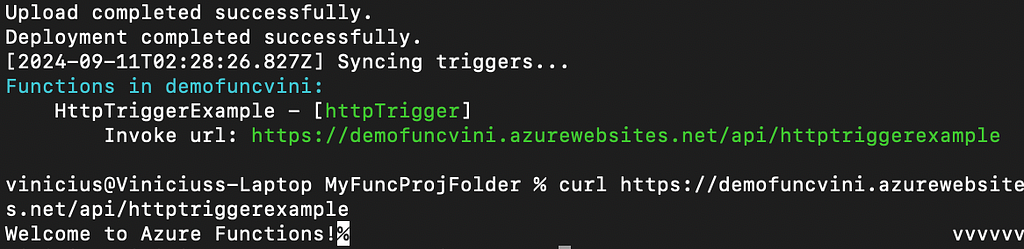
We can observe in our CLI that the function is active and operating correctly.
Accessing the Azure Portal:

It’s always important to delete your Resource Group at the end to avoid unnecessary costs, since the resources allocated within it continue to be billed while they are active, even if they are not in use.
az group delete --name demofunc-rgTo conclude, I would like to create one more example of how we can test our function locally, this time with a QueueTrigger. To do this, let’s return to our local project and run the following command:
func new --template "QueueTrigger" --name QueueTriggerExampleThe QueueTriggerExample.cs file is created in our project with the following content:
[Function(nameof(QueueTriggerExample))]
public void Run([QueueTrigger("myqueue-items", Connection = "")] QueueMessage message)
{
  _logger.LogInformation($"C# Queue trigger function processed: {message.MessageText}");
}
Before we start testing, it’s necessary to activate Azurite and configure the Connection in the project.
azurite --location ./azurite \  # directory where Azurite should store its data
  --silent \                    # silent mode, meaning it doesn't print log messages
  --debug ./azurite/debug.log   # activates debug mode and directs the logs
After configuring, update the Connection in the QueueTrigger attribute:
[Function(nameof(QueueTriggerExample))]
public void Run([QueueTrigger("myqueue-items", Connection = "AzureWebJobsStorage")] QueueMessage message)
{
  _logger.LogInformation($"C# Queue trigger function processed: {message.MessageText}");
}
func start # starts the functionNow, let’s publish our message to the “myqueue-items” queue. You will notice that the published message is in base64 because Azure Functions processes queue messages as if they were encoded in Base64.
az storage queue list --connection-string "UseDevelopmentStorage=true"

az storage queue create --name myqueue-items --connection-string "UseDevelopmentStorage=true"

az storage message put --queue-name myqueue-items --content "dGVzdGU=" --connection-string "UseDevelopmentStorage=true"
We were able to observe the public message being processed by our function.

Great! This is what I wanted to share with you in this second article about Azure Functions. I hope to have contributed a little more to our endless learning journey. 👨🏻💻
Originally published on Medium.